Fennec Learn
Courses, quizzes, drip and certificates. All in the free plugin.
Write courses and lessons in the block editor, group them into sections, and track every student’s progress. Drip schedules, quizzes and verifiable certificates are free, which is exactly where most LMS plugins start charging.
Built and tested, not yet on WordPress.org. We’ll email early-access sign-ups the day it’s ready to install.
Inside WordPress
What Fennec Learn looks like
Real screenshots from a WordPress install, not mockups.
The free plugin
Everything here is free. No license key, no locked buttons.
This list is the free plugin as it runs today, taken from its readme. If it isn't shipped, it isn't on this list.
Courses in the block editor
Courses are regular pages you design with blocks. Lessons are their own posts.
Course builder
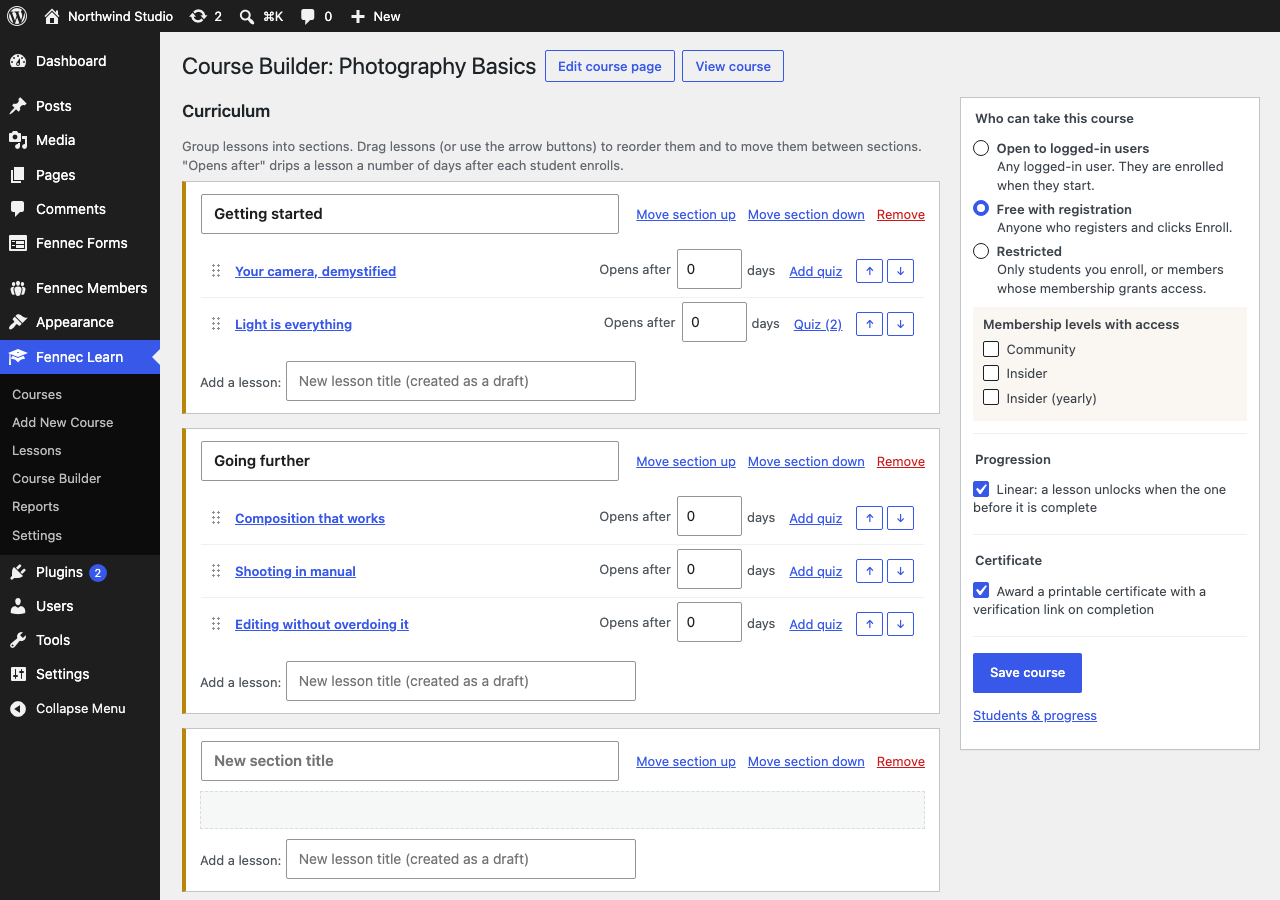
Group lessons into sections, drag to reorder (or use arrow buttons, no JavaScript required), and create lessons right from the builder.
Three ways to enroll
Open to any logged-in user, free with registration, or restricted to students you enroll or members of the right level.
Progress tracking
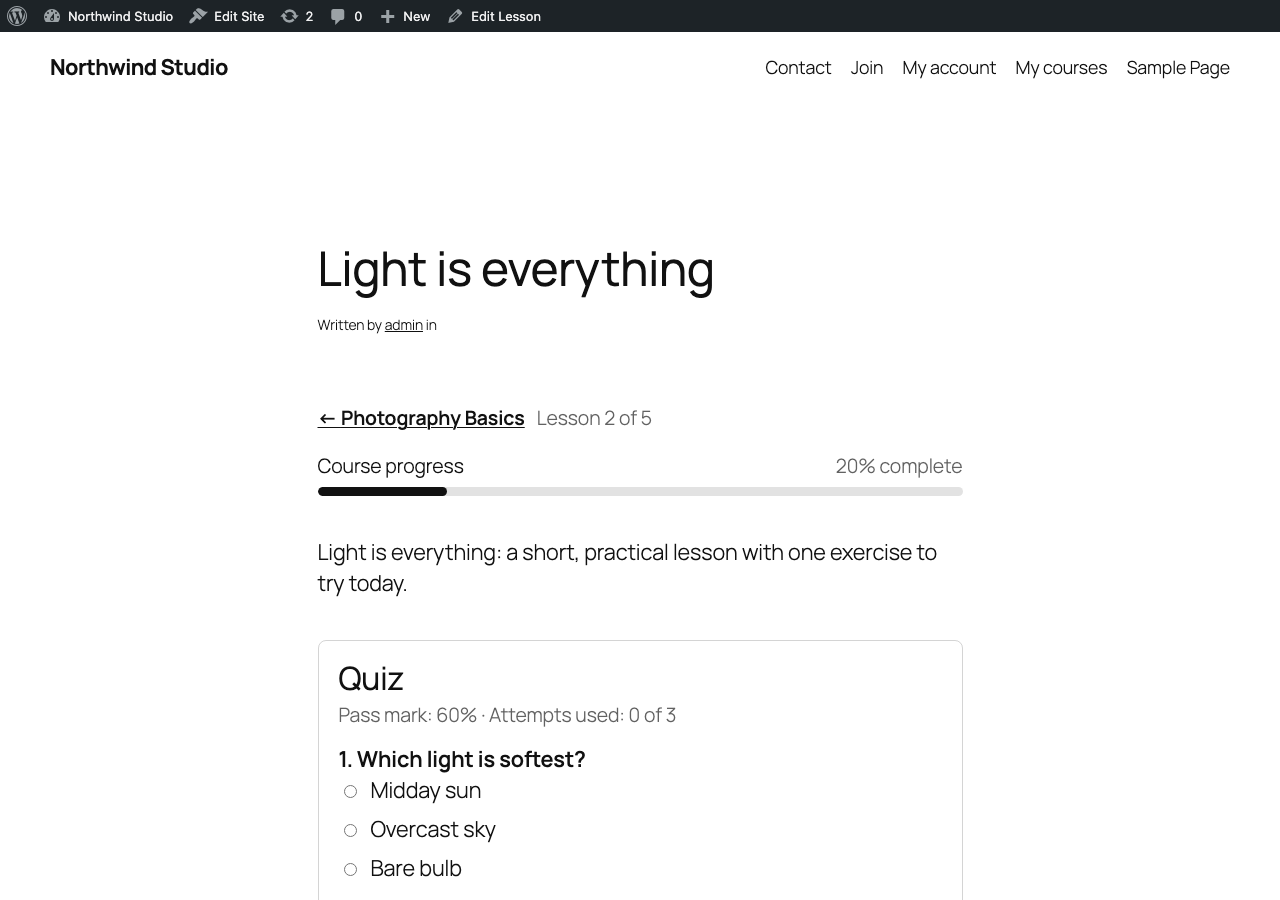
“Mark complete” on every lesson, course progress bars, and a Continue button that remembers where each student left off.
Linear progression and drip
Require lessons in order, and open a lesson a set number of days after each student enrolls.
Quizzes
Multiple choice, true/false and short answer, a pass mark and a retake limit. Passing can be required to complete the lesson. Answers never reach the browser.
Certificates
A printable certificate of completion with a public verification link. No PDF service; nothing leaves your site.
Student dashboard and outline blocks
Each student’s courses with progress, and a curriculum with lock and completion states plus the right button.
Reports
Enrollments and completion rate per course, per-student progress, manual enroll and unenroll, quiz resets and CSV export.
Private by design
Lesson content is hidden from visitors, search and the REST API unless the viewer has access.
Fennec Learn Pro
Pro is on the way
Pro is a separate add-on plugin. The free plugin never contains locked code, and if a Pro license lapses, Pro keeps working. You only stop getting updates.
See early-access pricingPlanned, not built yet
- Sell courses directly with Stripe (today: sell access through Fennec Members)
- Question banks, randomized questions, timers and essay grading
- Visual certificate designer and PDF attachments
- Drip by date or by section
- Assignments, instructors and groups
Compared honestly
Fennec Learn vs LearnDash and Tutor LMS
The incumbents are mature products with years of add-ons. Here's where the free and entry tiers differ, with sources.
| As of Sep 2026 | Fennec LearnFree core; Pro pricing later | LearnDashNo free version; $259 / $399 / $599 per year | Tutor LMS (free)Free; Pro $199 / $399 / $799 per year |
|---|---|---|---|
| Free edition | Yes | No | Yes |
| Certificates in the free edition | Yes | n/a | No |
| Content drip in the free edition | Yes | n/a | No |
| Free with no trial clock | Yes | 48-hour trial only | Yes |
| AI agent access (Abilities / MCP) | Yes | Not listed | Not listed |
Figures come from our September 2026 LMS research, with the vendor sources linked above. LearnDash offers a 48-hour trial, not a free edition. Tutor LMS lists certificates and content drip as Pro features. “Not listed” means we couldn’t confirm it on the vendor’s own pages. Sources: Liquid Web: LearnDash, tutorlms.com/pricing.
Head to head: Fennec Learn vs LearnDash · Fennec Learn vs Tutor LMS
Selling courses
Sell access with Fennec Members, at 0% fees
Set a course to Restricted and pick the membership levels that unlock it. Members pay through your own Stripe account. If a membership lapses, the course closes and the student's progress is kept for when they come back.
- 1Create a paid level in Fennec Members
- 2Set the course to Restricted in the course builder
- 3Tick the levels that unlock it
Selling a course directly with Stripe, without Members, is planned for Learn Pro. About Fennec Members
For developers and AI agents
Public hooks, suite events and WordPress Abilities
11+ documented filters and actions, 6 events on the shared Fennec event bus, and 3 abilities for AI agents. Anything touching personal data is hidden from agents until you opt in.
Developer docsAbilities
fennec-learn/list-coursesagent-visibleList courses (read-only).
fennec-learn/get-course-outlineagent-visibleA course’s sections and lessons (read-only).
fennec-learn/get-student-progresshidden by defaultA student’s progress. Personal data, hidden from agents unless you opt in.
Events
fennec-learn/course-enrolledfennec-learn/course-unenrolledfennec-learn/lesson-completedfennec-learn/quiz-passedfennec-learn/quiz-failedfennec-learn/course-completed
Learn questions
Do students need an account?
Yes. Progress, quizzes and certificates belong to a WordPress user. Visitors see the outline and a log-in or register button.
Can I sell courses?
Short answer: with Fennec Members. Make the course restricted and pick the membership levels that unlock it. If a membership lapses, the course closes and the student’s progress is kept.
How are certificates verified?
Each one has a unique code and a link on your own site. Verification pages are marked noindex.
Can I download it today?
Not yet. Fennec Learn is in early access and isn’t on WordPress.org yet. Join the list and you’ll get it first.
What happens to course data if I uninstall?
It stays. Courses, enrollments, progress and quiz attempts are kept unless you tick the delete option in Settings first.
Early access
Get Fennec Learn first
Fennec Learn is built and tested, and it isn’t on WordPress.org yet. Leave your email and you’ll get it the day it’s ready, plus final Pro pricing before anyone else.